 virtualhome.blog My blog about virtualized infrastructures, backup and disaster recovery topics and the cloud !
Related Articles


In this blog series, I’m going to talk about plenty of things around the sizing and architecting for using Object Storage with Veeam Backup & Replication. Each part of this blog series covers different topics and things. The fourth and last part of Sizing and Architecting for Object Storage with Veeam covers all the topics around Veeam Object Storage Benchmarking. This blog post is intended to help you set up a tool of choice for benchmarking and how to test the Veeam I/O.
Within block / SAN environments, there are lots of benchmarking tools available like “fio”, “diskspd” or “IOMeter”. This is not feasible or possible with S3 or s3 compatible object storage because it simply behaves different.
Currently, there are many tools available for benchmarking object storage, whereby my favourite ones are listed here:
- Warp from Minio (https://github.com/minio/warp)
- S3Bench / Cosbench from Intel (https://github.com/intel-cloud/cosbench)
- Gosbench — a rewritten Cosbench tool in Go Language (https://github.com/mulbc/gosbench)
- HotSauce S3 Bench — a tool from Wasabi (https://github.com/markhpc/hsbench)
While benchmarking for block & file with Veeam is pretty straightforward, it is not for Object and S3.
If you need Benchmarking hints or links to follow, make sure to check out these 2 resources.
- Backup Benchmarking Done Right by my fellow Vanguard Friend Matthias Beller: Backup Benchmarking Done Right
- How to simulate Veeam Backup & Replication Disk I/O: Veeam Simulate Disk I/O
However, with S3 and specifically with Direct to S3, we cannot simply take that Veeam KB article on how to simulate Veeam Backup & Replication I/O and translate it to Object Storage / S3. For example, Synthetic Full Backups or Merge operations do not really exist here, however we can still reflect this in our tests a bit.
Veeam Object Storage Benchmarking with Warp
Test Scenarios
- Active Full Backups & Forward Incremental with fixed Block Sizes / Object Sizes of
256k, 512k, 1 MB, 4 MB, 8 MB
-
Synthetic Full & Merge operations which do not exist within a Direct to Object use case, however if we do 50% PUTS and 50% GETS with “–get-distrib” and “–put-distrib” we can simulate backup and restore I/O at the same time. Of course with fixed Block Sizes / Object Sizes of 256k, 512k, 1 MB, 4 MB, 8 MB.
- Restore, Health Checks, Sure Backup and basically 100 % Read I/O with fixed Block Sizes / Object Sizes of 256k, 512k, 1 MB, 4 MB, 8 MB
- All of the above again, with Random Block Sizes / Object Sizes to get even more details.
One thing which I like about Warp is the ability to do a “Dsitributed” Benchmarking. You can bundleWarp clients together to simulate different endpoints / clients accessing the S3 Object Storage / Bucket.
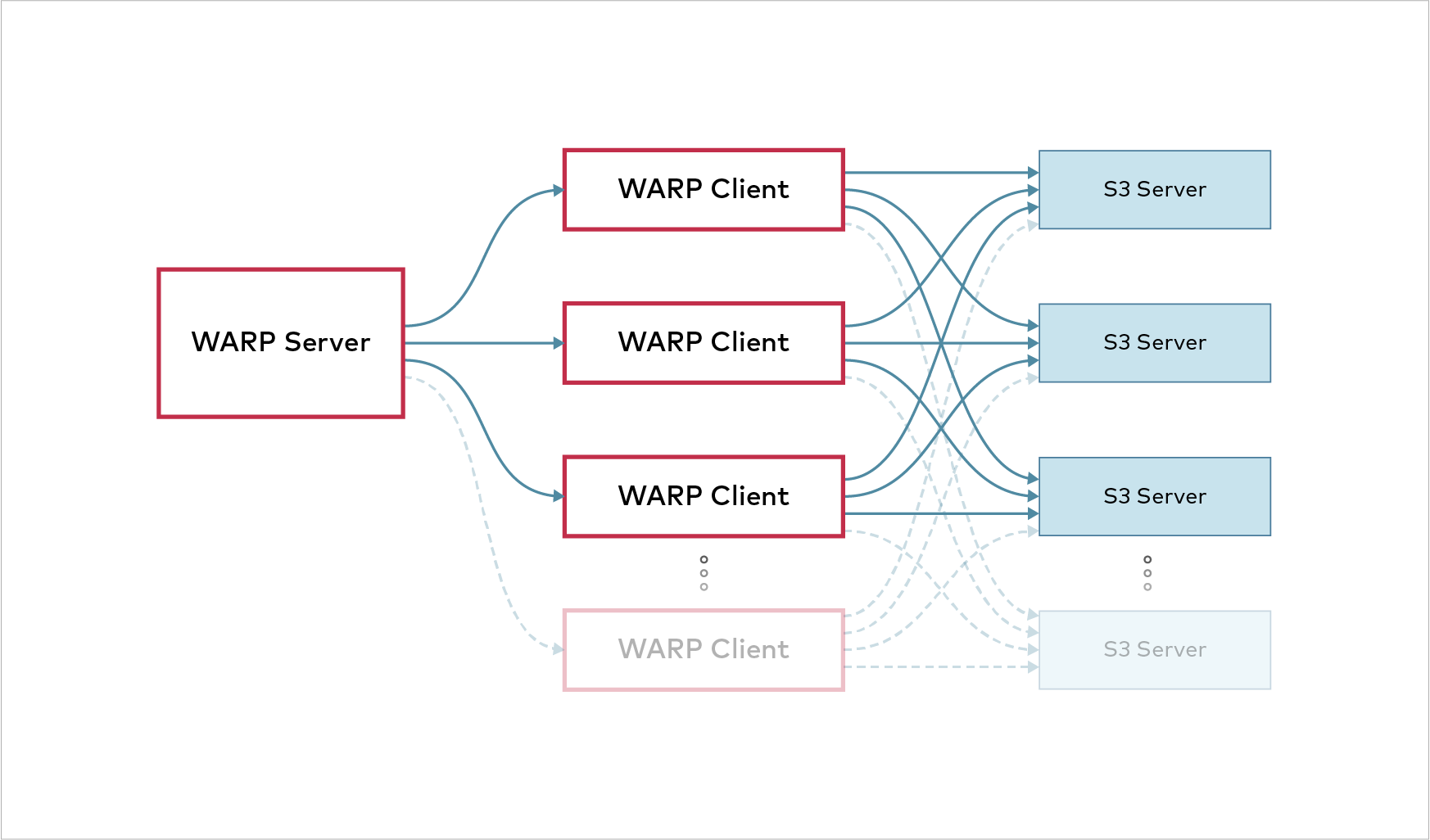
You could also run Warp on Kubernetes and create hundreds of containers to test very parallel.
However, for the sake of simplicity I’m only using one client in this blog post, but wanted to make sure to mention this as it is crucial if you really want to seriously test an object storage system.
Installing Warp on a Client
Follow the instructions on the Github Page of Warp to install Warp on your client as needed. You can either compile it yourself, or you simply take a binary release from the Releases page.
I installed the Warp client on my MacBook locally for this blog post. However, if you want to test this in real environments for Veeam, make sure to use Gateway Servers or the “most direct server / client” which interacts with the object storage system.
|
1 |
git clone https://github.com/minio/warp.git |
|
1 |
cd warp && go build |

If everything has compiled succesfully, you can run warp from the terminal.

Simulating Veeam Backup & Replication I/O with Object Storage and Warp with FIXED Block / Object Sizes
Now that we have set up the Warp Client we can test the different I/O patterns produced by Veeam Backup & Replication. The first set of Benchmarks Test should be the ones with fixed Block Sizes / Object Sizes. In all my tests I’m using the default of parallelism with “–concurrent=64”. You can adjust this to your needs and increase it if its necessary. However scaling this with different Warp clients will give you better insights than a single client with more concurrent tasks. In addition I always let the tests run for at least 60 seconds to see how it stabilizes (or not) over time. This paired with a network tool can help you understand bottlenecks in a network. Of course you need the DNS or ip-address of your object storage system as well as a bucket, access and secret keys.
Active Full Backups & Forward Incremental
For Active Full Backups & Forward Incremental Backups we have Write I/O which translates into Object PUTS. Therefore we are using the “warp put” command here.
Benchmarking put operations will upload objects of size “–obj.size” until “–duration” time has elapsed.
|
1 2 3 4 5 6 7 8 9 |
warp put --host=DNS/IP --access-key=your-key-heww --secret-key=your-key-here--bucket=warp-s3-benchmark --concurrent=64 --obj.size=256k --duration=60s warp put --host=DNS/IP --access-key=your-key-heww --secret-key=your-key-here--bucket=warp-s3-benchmark --concurrent=64 --obj.size=512k --duration=60s warp put --host=DNS/IP --access-key=your-key-heww --secret-key=your-key-here--bucket=warp-s3-benchmark --concurrent=64 --obj.size=1MB --duration=60s warp put --host=DNS/IP --access-key=your-key-heww --secret-key=your-key-here--bucket=warp-s3-benchmark --concurrent=64 --obj.size=4MB --duration=60s warp put --host=DNS/IP --access-key=your-key-heww --secret-key=your-key-here--bucket=warp-s3-benchmark --concurrent=64 --obj.size=8MB --duration=60s |
All of the above commands are the same except the block / object sizes differ to reflect the settings in a Veeam Backup Job.
Synthetic Full & Merge operations
Synthetic Full & Merge operations do not exist within a Direct to Object use case, however if we do 50% PUTS and 50% GETS with “–get-distrib” and “–put-distrib” we can simulate backup and restore I/O at the same time. This can lead to interesting benchmark results to see how your object-storage systems handles I/Os when both PUTS and GETS are reaching your system. We are using the “warp mixed” command here.
Mixed mode benchmark will test several operation types at once. The benchmark will upload “–objects” objects of size “–obj.size” and use these objects as a pool for the benchmark. As new objects are uploaded/deleted they are added/removed from the pool. So you will really get different read & write I/O here.
The “warp mixed” command will basically use “PUT”, “GET”, “DELETE” and “STAT” commands to the S3-compatible object storage to do a mixed kind of workload profile.
You could also mix this up with “warp versioned” which is another workload from Warp utiliziing versioned objects.
|
1 2 3 4 5 6 7 8 9 10 11 12 13 |
warp mixed --host=DNS/IP --access-key=your-key-here --secret-key=your-key-here --bucket=warp-s3-benchmark --concurrent=64 --obj.size=256k --get-distrib=50 --put-distrib=50 --duration=60s warp mixed --host=DNS/IP --access-key=your-key-here --secret-key=your-key-here --bucket=warp-s3-benchmark --concurrent=64 --obj.size=512k --get-distrib=50 --put-distrib=50 --duration=60s warp mixed --host=DNS/IP --access-key=your-key-here --secret-key=your-key-here --bucket=warp-s3-benchmark --concurrent=64 --obj.size=1MB --get-distrib=50 --put-distrib=50 --duration=60s warp mixed --host=DNS/IP --access-key=your-key-here --secret-key=your-key-here --bucket=warp-s3-benchmark --concurrent=64 --obj.size=4MB --get-distrib=50 --put-distrib=50 --duration=60s warp mixed --host=DNS/IP --access-key=your-key-here --secret-key=your-key-here --bucket=warp-s3-benchmark --concurrent=64 --obj.size=8MB --get-distrib=50 --put-distrib=50 --duration=60s |
The last portion of tests is the one where we simulate a 100% Read I/O to understand how different processes work. For example Restores, Health-Checks and Sure Backups where we have a heavy Read I/O. For this we are obviously using the “warp get” command here.
Benchmarking get operations will attempt to download as many objects it can within “–duration”
|
1 2 3 4 5 6 7 8 9 10 11 12 13 |
warp get --host=DNS/IP --access-key=your-key-here --secret-key=your-key-here --bucket=warp-s3-benchmark --concurrent=64 --obj.size=256k --duration=60s warp get --host=DNS/IP --access-key=your-key-here --secret-key=your-key-here --bucket=warp-s3-benchmark --concurrent=64 --obj.size=512k --duration=60s warp get --host=DNS/IP --access-key=your-key-here --secret-key=your-key-here --bucket=warp-s3-benchmark --concurrent=64 --obj.size=1MB --duration=60s warp get --host=DNS/IP --access-key=your-key-here --secret-key=your-key-here --bucket=warp-s3-benchmark --concurrent=64 --obj.size=4MB --duration=60s warp get --host=DNS/IP --access-key=your-key-here --secret-key=your-key-here --bucket=warp-s3-benchmark --concurrent=64 --obj.size=8MB --duration=60s |
Simulating Veeam Backup & Replication I/O with Object Storage and Warp with RANDOM Block / Object Sizes
Now that we tested it with a fixed block size per I/O profile, we are now doing it with a random object size. For this scenario Warp has a great switch in the command. It is possible to randomize object sizes by specifying “–obj.randsize” and files will have a “random” size up to the defined “–obj.size”. This is especially important as in the real world, source side deduplication & compression by Veeam varies. That means a 4 MB object can actually be 2 MB but also it could be 2,769 MB or 1,89 MB. This is why the “–obj.randsize” switch is so cool because it randomizes the object size up to the given one. This means you can really simulate the “real world” up to the Object Size given in a backup job of Veeam.
Active Full Backups & Forward Incremental with random Block / Object Sizes
|
1 2 3 4 5 6 7 8 9 10 11 12 13 |
warp put --host=DNS/IP --access-key=your-key-here --secret-key=your-key-here --bucket=warp-s3-benchmark --concurrent=64 --obj.size=256k --obj.randsize --duration=60s warp put --host=DNS/IP --access-key=your-key-here --secret-key=your-key-here --bucket=warp-s3-benchmark --concurrent=64 --obj.size=256k --obj.randsize --duration=60s warp put --host=DNS/IP --access-key=your-key-here --secret-key=your-key-here --bucket=warp-s3-benchmark --concurrent=64 --obj.size=256k --obj.randsize --duration=60s warp put --host=DNS/IP --access-key=your-key-here --secret-key=your-key-here --bucket=warp-s3-benchmark --concurrent=64 --obj.size=256k --obj.randsize --duration=60s warp put --host=DNS/IP --access-key=your-key-here --secret-key=your-key-here --bucket=warp-s3-benchmark --concurrent=64 --obj.size=256k --obj.randsize --duration=60s |
Synthetic Full & Merge operations with random Block / Object Sizes
|
1 2 3 4 5 6 7 8 9 10 11 12 13 |
warp mixed --host=DNS/IP --access-key=your-key-here --secret-key=your-key-here --bucket=warp-s3-benchmark --concurrent=64 --obj.size=256k --obj.randsize --get-distrib=50 --put-distrib=50 --duration=60s warp mixed --host=DNS/IP --access-key=your-key-here --secret-key=your-key-here --bucket=warp-s3-benchmark --concurrent=64 --obj.size=512k --obj.randsize --get-distrib=50 --put-distrib=50 --duration=60s warp mixed --host=DNS/IP --access-key=your-key-here --secret-key=your-key-here --bucket=warp-s3-benchmark --concurrent=64 --obj.size=1MB --obj.randsize --get-distrib=50 --put-distrib=50 --duration=60s warp mixed --host=DNS/IP --access-key=your-key-here --secret-key=your-key-here --bucket=warp-s3-benchmark --concurrent=64 --obj.size=4MB --obj.randsize --get-distrib=50 --put-distrib=50 --duration=60s warp mixed --host=DNS/IP --access-key=your-key-here --secret-key=your-key-here --bucket=warp-s3-benchmark --concurrent=64 --obj.size=8MB --obj.randsize --get-distrib=50 --put-distrib=50 --duration=60s |
Restore, Health Checks, Sure Backup and basically 100 % Read I/O with random Block / Object Sizes
|
1 2 3 4 5 6 7 8 9 10 11 12 13 |
warp get --host=DNS/IP --access-key=your-key-here --secret-key=your-key-here --bucket=warp-s3-benchmark --concurrent=64 --obj.size=256k --obj.randsize --duration=60s warp get --host=DNS/IP --access-key=your-key-here --secret-key=your-key-here --bucket=warp-s3-benchmark --concurrent=64 --obj.size=512k --obj.randsize --duration=60s warp get --host=DNS/IP --access-key=your-key-here --secret-key=your-key-here --bucket=warp-s3-benchmark --concurrent=64 --obj.size=1MB --obj.randsize --duration=60s warp get --host=DNS/IP --access-key=your-key-here --secret-key=your-key-here --bucket=warp-s3-benchmark --concurrent=64 --obj.size=4MB --obj.randsize --duration=60s warp get --host=DNS/IP --access-key=your-key-here --secret-key=your-key-here --bucket=warp-s3-benchmark --concurrent=64 --obj.size=8MB --obj.randsize --duration=60s |
Benchmarking in Action
Because I like Minio’s warp so much I simply did a “brew install minio” on my MacBook to run the community editon of Minio to test Warp against an S3 bucket based on Minio. After I started the Minio server I ran one of the benchmark commans here to showcase how it works. Remember, this is my local MacBook and this blog post is not intended to showcase what S3 solution delivers which outcomes. This blog post is solely there for showcasing on “how” to benchmark S3 compatible object storage.
Benchmarking Object-Locking with Warp
On top of the tests outlined here, one more very important topic is benchmarking “PutObjectRetention” so essentially uploading objects of a specific size and then applying versions to it. This is what we need in terms of “Object Locking” and Immutability.
Within Warp we can leverage this test with the command “warp retention” to simulate uploading objects with versions to see how the “PutObjectRetention” call works.
In this example I’m uploading 5000 objects with 5 versins each which Warp measures. Warp points out how the average objects per second are and how many ms/req it takes. All pretty relevant information to size for Object Storage within Veeam.
Wrap up and other things to consider while Benchmarking
Some other things to consider while Benchmarking S3 compatible object storage are.
- Run those benchmarks as close as possible to the storage endpoint or the Veeam component you are using (Gateway Server) to minimize latency.
- Try do avoid other traffic on the network to get proper results
- Obviously adjust object size and concurrency parameters to reflect your production like architecture and I/O patterns
- Monitor CPU, Memory and Disk I/O plus network usage on the Warp Cliend and object storage nodes / system to get a complete overview.
- Benchmark results can be misleading if the client is the bottleneck!
-
Don’t run it once, but rather run multiple iterations and average results to account for efficiency mechanisms like caching or warm-up effects.
Veeam Object Storage Benchmarking – Part 4
I really hope this third part of the blog series around Benchmarking for Object Storage was interesting. Feel free to comment and give some hints and tips which I can add here. Here are all the articles on the 4 part series around Object Storage for Veeam.
- Sizing and Architecting for Object Storage with Veeam – Part 1
- Sizing and Architecting for Object Storage with Veeam – Part 2
- Sizing and Architecting for Object Storage with Veeam – Part 3
- Sizing and Architecting for Object Storage with Veeam – Part 4
Check out all Veeam related posts on my blog here: Veeam Blog Posts